Microservices within FlowWright were very popular with some of our customers, especially those who handle real-time workflows. How can we design a workflow visually and turn it into a simple-to-call REST API? Still, most also value the fast execution of these workflows in memory.
We have introduced several new enhancements to FlowWright’s Microservices. Based on customer feedback, we have added support for GET and POST HTTP calls.
FlowWright microservices using HTTP GET or POST requests.

The execution of Microservices is now access-controlled. As an Admin, you can grant access to all users or specific users and application roles using the UI.

With HTTP POST support, you can now pass more complex objects as inputs to the call. When defining input parameters, a new checkbox lets you check and pass the value using the HTTP request body.

Complex objects in JSON format can be sent using the body form. The resulting REST API call will appear as follows:
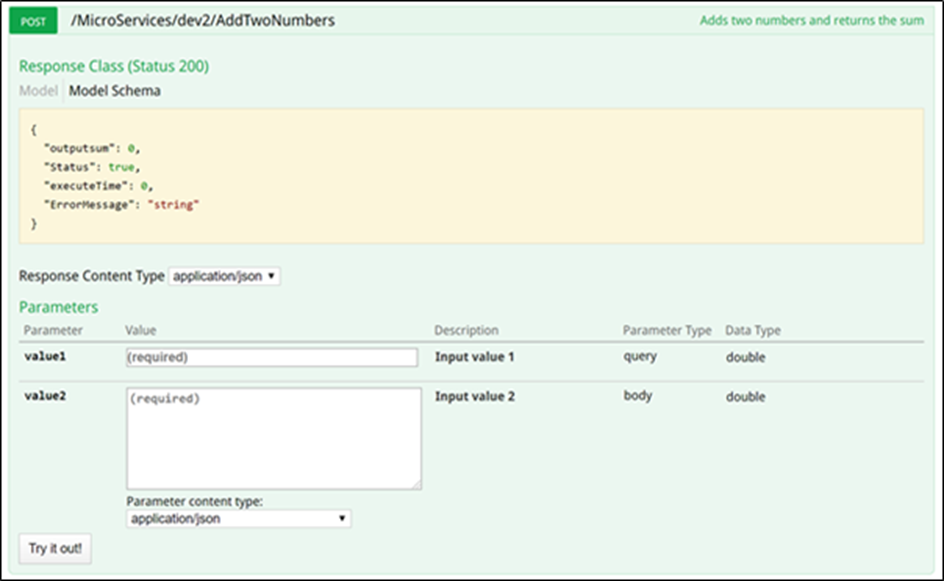
As shown in the above graphic, the API call documentation indicates that the “value2” parameter will be passed in the request body.
Another improvement has been made to the listing view of Microservices.
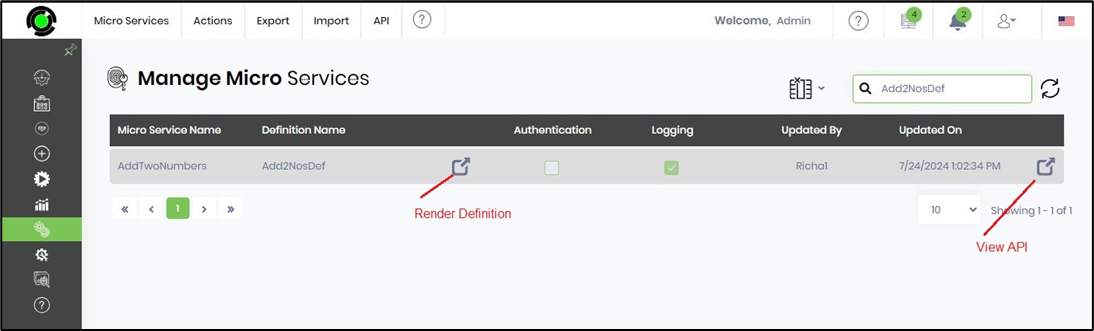
The first navigate icon displays the workflow definition used by Microservice. The last icon goes directly to the REST API call, and we have enhanced the navigation to it.
When it comes to security, Microservices still support basic authentication. However, with the introduction of OAuth token authentication, Microservices now support token-based authentication. When calling a Microservice, instead of sending basic authentication credentials, send a bearer token as authentication. The Microservice will validate the token against the FlowWright security infrastructure and perform the call. Using OAuth tokens with Microservices is much more secure than basic authentication.