FlowWright REST API was traditionally secured with basic authentication using a username and password. With FlowWright, we now support OAuth-based authentication. OAuth is secure and popular among web application developers. Many applications (such as Facebook, LinkedIn, Twitter, HubSpot, SugarCRM, and Salesforce) support OAuth authentication.
What is OAuth?
OAuth is an open standard for access delegation. Internet users commonly use it to grant websites or applications access to their information without sharing passwords.
How does FlowWright OAuth work?
The diagram below illustrates the initial token request using the FlowWright REST APIs.
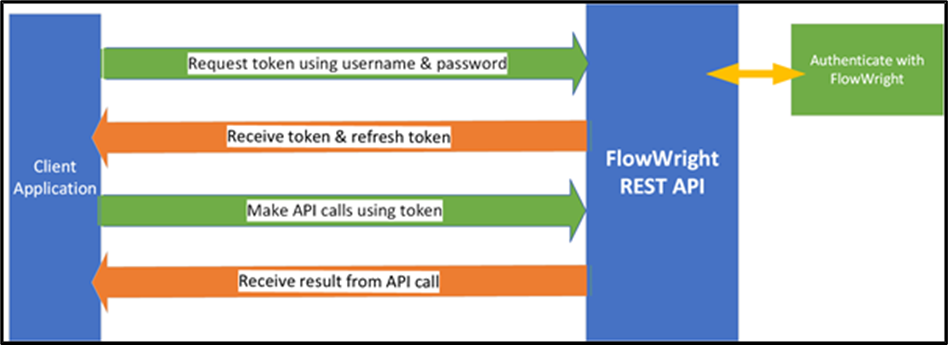
An HTTP POST request is sent to the following URL.
http://localhost:8080/api/token
With the POST request, the following fields and values are sent in the form body:
- username – FlowWright username
- password – FlowWright user password
The FlowWright REST API will authenticate the user against FlowWright security. If authentication succeeds, a response will be returned in JSON format. The response will look as follows:
FlowWright OAuth token request
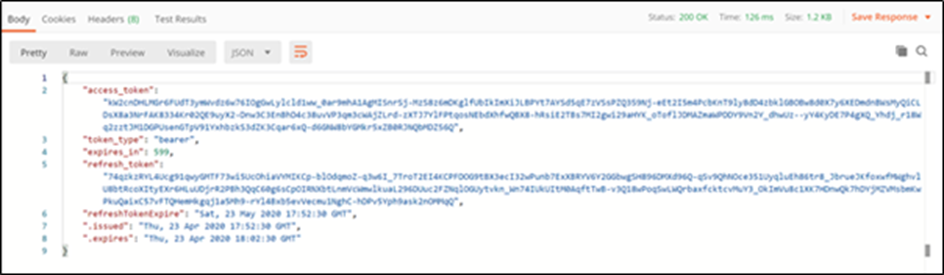
The JSON response contains the following information:
- access_token – a token for making REST API calls
- token_type – bearer type token
- expires_in – expiration in seconds
- refresh_token – refresh token for requesting tokens in the future
- refreshTokenExpire – expiration date/time of refresh token in UTC
- .issued – issued date/time of token in UTC
- .expires – expiration date/time of token in UTC
Calls to the REST API can be made using the “access token” from the response above. Call the REST API as before, but instead of passing the username and password for authentication, use the token with “Bearer” as the authentication method. Below is a graphic that illustrates the request using the POSTMAN tool:
FlowWright OAuth uses an access token to make REST API calls

Once the request is sent, FlowWright validates the token. If successful, it calls the intended REST API and returns the result in JSON format. In the example above, we called the “getUsers” REST API; the following JSON response was returned.
JSON response from REST API call

By default, the “access token” expires in 10 minutes. The REST API will return the result “token expired” if it is used after expiration. To avoid this, you must use the “refresh token” to request a new access token. Below is the process:
FlowWright REST API OAuth refresh token request.
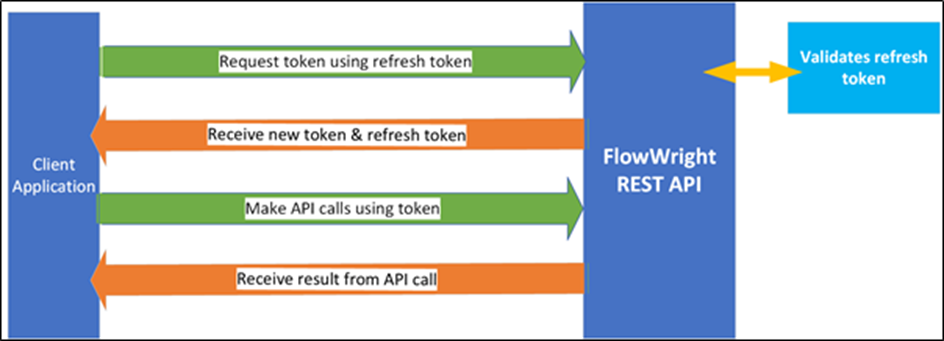
To request a new token, an HTTP POST request is sent to the token URL:
http://localhost:8080/api/token
The following information is included in the request body:
- grant_type – set the grant type to “refresh_token”
- refresh_token – pass the refresh token received from the first token call
FlowWright's REST API will validate the refresh token, and if successful, it will return a JSON response similar to the previous one:

The new “access token” can now make REST API calls to FlowWright. The refresh token is valid for 30 days by default. All token dates and times are in UTC. The default expiration values for access and refresh tokens can be modified in the “Web.config” file of the FlowWright REST API.
Because most REST APIs are stateless, each call must include authentication and validation. We have enhanced the REST API to be "stateful" to maintain user sessions. With these enhancements, we can achieve higher throughput and performance, shorter execution times, and more efficient development.
These generated OAuth tokens can also be used for authentication in other parts of the FlowWright application, particularly in the Microservices and Configuration Manager user interfaces.