clsGenerateTenantActivity Step
Description:
The Tenant Activity step enables a FlowWright workflow to generate an activity report for a tenant using a configured Tenant Manager connection.
In multi-tenant environments, administrators frequently need visibility into tenant usage, operational activity, and system events. Rather than manually collecting tenant information, this step automatically generates a tenant activity report that can be consumed by subsequent workflow activities.
The step connects to the selected Tenant Manager connection, retrieves the available tenant activity information, generates the report, and stores the resulting report in a workflow variable or global variable. The report can then be used for reporting, dashboards, notifications, auditing, archival, or integration with external systems.
Typical uses include:
- Generating tenant activity reports
- Monitoring tenant operations
- Producing administrative dashboards
- Supporting operational auditing
- Sending tenant activity summaries
- Exporting tenant information
- Supporting capacity planning
- Collecting operational statistics
This step enables organizations to automate tenant reporting while improving operational visibility across multi-tenant FlowWright environments.
Inputs
- Select Tenant Manager Connection – Specifies the Tenant Manager connection used to retrieve tenant activity information. This property is required.
- Variable/Global to Store Report - Specifies the workflow variable or global variable that will receive the generated tenant activity report. This property is required.
Returns
- True – The tenant activity report was successfully generated and stored in the configured workflow variable or global variable. Workflow execution continues through the success path.
- False – The report could not be generated because of an invalid Tenant Manager connection, connectivity issues, insufficient permissions, or another execution error. Workflow execution follows the alternate path.
Usage:
The Tenant Activity step is typically used in administrative workflows, monitoring processes, scheduled reporting workflows, and tenant management automation.
During execution:
- Read the configured Tenant Manager connection.
- Connect to the Tenant Manager.
- Retrieve tenant activity information.
- Generate the tenant activity report.
- Store the generated report in the configured workflow variable or global variable.
- Continue workflow execution through either the True or False return path.
A typical workflow might look like this:

The Tenant Activity step is typically used in administrative workflows, monitoring processes, scheduled reporting workflows, and tenant management automation.
During execution:
- Read the configured Tenant Manager connection.
- Connect to the Tenant Manager.
- Retrieve tenant activity information.
- Generate the tenant activity report.
- Store the generated report in the configured workflow variable or global variable.
- Continue workflow execution through either the True or False return path.
Example:
Let’s build and execute the “clsGenerateTenantActivityDef” example.
- Create a new process definition named “clsGenerateTenantActivityDef” and open it in designer mode.
- Drag the “clsGenerateTenantActivity” step to the canvas.
- Connect the dots between the “Start” step and “clsGenerateTenantActivity” steps, as shown above.
- Select the line between the steps to configure the “Connection Properties”. The default property values are “None, True, False, Error, and Evaluate”. Depending on the step’s purpose, additional values are available for configuration.
- Define a variable or a global to store the result.
-
Click the ”clsGenerateTenantActivity" step to configure its "Required" properties. Provide a name for the step. Select the connection string. Specify a variable or a global to store the activity report for all active tenants. Click the Save button. Note: Click the "AI Predict" button to have the Copilot add new process steps that match your process description.

- The “Logging” configuration is necessary for documentation and also measures workflow progress and percent complete. This is achieved by configuring the step state and percent fields individually, as shown below. Configure the “Logging” using the following properties.

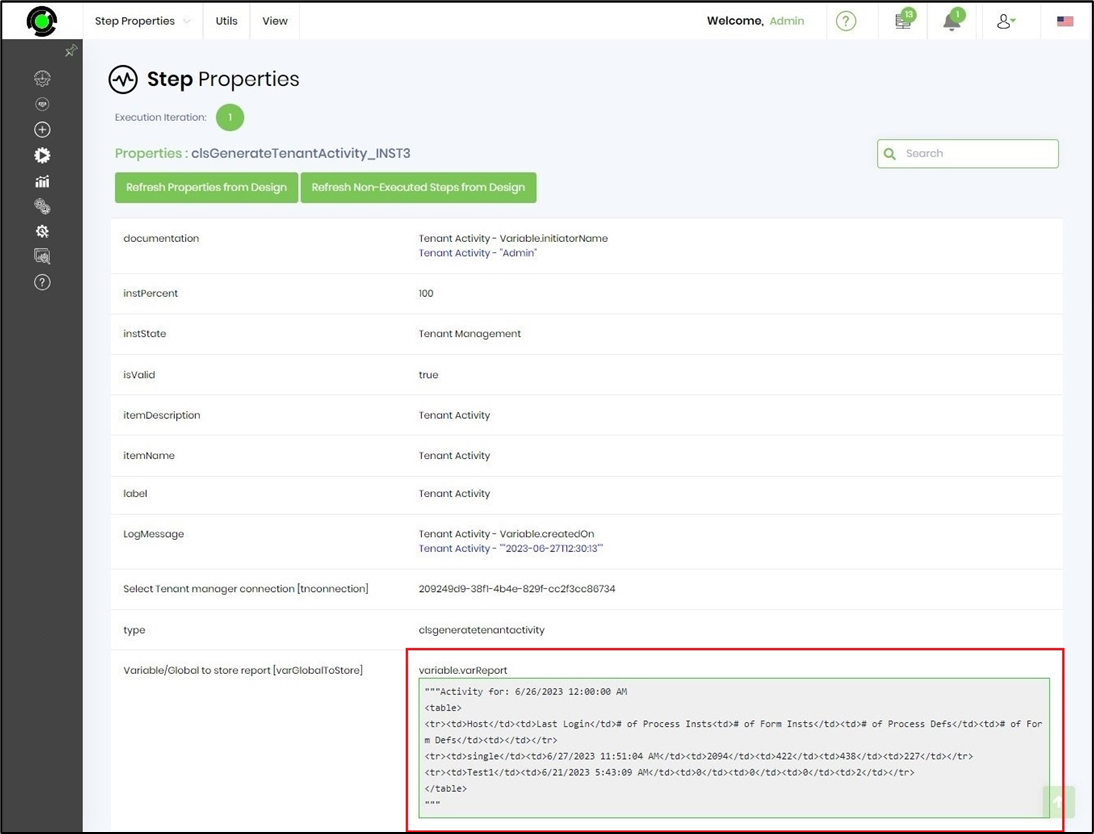
- Save the process definition, create a new instance, and execute it. Render the process instance. Click the process step to view its properties. The step should generate the tenant activity report (shown below), with table column headers for the hostname, last login, number of process instances, number of form instances, number of process definitions, and number of form definitions.
Tips:
- Verify that the selected Tenant Manager connection is valid before executing the workflow.
- Store the generated report in a global variable if multiple workflow branches require access to it.
- Schedule this step to execute during off-peak hours when generating large tenant reports.
- Combine this step with reporting, email, or archival steps to automate operational reporting.
- Route the False execution path to logging and administrator notification activities for easier troubleshooting.
- Combine this step with Send Email, Generate PDF, Store File in DB, Add Message to History, or reporting steps to build comprehensive tenant-monitoring workflows.
Notes:
- The Select Tenant Manager Connection property is required.
- The Variable/Global to Store Report property is required.
- The step generates a tenant activity report using the configured Tenant Manager connection.
- The generated report is stored in the configured workflow variable or global variable.
- The step does not modify tenant configuration or tenant data; it only generates a report based on available tenant activity information.
- Both the True and False execution paths should be implemented for complete workflow handling.
- Appropriate permissions to access the configured Tenant Manager connection are required.
Definition Sample:
You may download the sample workflow definition from the link provided and import it into your FlowWright environment.
Note: Verify and complete any missing configuration after importing the sample, including:
- Tenant Manager connection
- Variable/Global to store the generated report
- Success and failure workflow branches
- Appropriate Tenant Manager permissions
After verifying the configuration, save and publish the workflow before execution.
Click here to download the sample XML file.