ChangeUserInfo Step
Description:
The Change User Info workflow step is used to update information associated with a FlowWright user from within a workflow.
The step supports:
- Identifying the user through a process user ID.
- Changing the user's username.
- Changing the user's full name.
- Changing the user's email address.
- Using Variables or other workflow-generated values for the user information.
- Continuing the workflow through the True return path.
- Using the False return path for an alternative workflow path or error handling.
Inputs
- Process User ID – The Process user ID property identifies the user whose information to change.
- User Name for the User – The User name for the user property specifies the username value to apply to the user.
- Full Name for the User – The Full Name for the User property specifies the full name value to apply to the user.
- Email Address for the User – The Email Address for the User property specifies the email address value to apply to the user.
Returns
- True – The True return path can be connected to the next workflow activity when the user-information update operation succeeds.
- False – The False return path can be used for an alternative workflow path or error-handling logic when the operation does not succeed.
Usage:
The Change User Info step is typically placed after a workflow has determined that a user's account information needs to be updated.
The workflow identifies the user using the required process user ID and supplies one or more optional values for the username, full name, or email address.
A typical workflow pattern is:
Get User Information → Change User Info → Continue Process
The step can then be used as part of workflows that:
- Update user account information.
- Synchronize workflow-generated user information.
- Apply changes submitted through a form.
- Update contact information.
- Continue processing after a user update.
- Route processing through the True or False return paths.

Typical Workflow Suggestions:
Update User Information from a Form
Use the step when a user submits updated account information through a FlowWright form.
Example:
User Form → Change User Info → Continue Process
The process user ID identifies the user, while the submitted username, full name, or email values can be supplied to the corresponding properties.
Update a User's Email Address
Use this step when a workflow needs to update the email address associated with a user.
Example:
Process Request → Change User Info → Send Notification
The workflow can provide the process user ID and the new email address while leaving other optional user-information properties unconfigured.
Synchronize User Information
Use the step as part of a workflow that receives updated user information from another source.
Example:
Retrieve User Data → Change User Info → Log Update
The retrieved username, full name, or email address can be supplied to the optional properties.
Update User Information During an Administrative Process
Use this step when an administrative workflow needs to apply changes to an existing user.
Example:
Administrator Request → Validate Changes → Change User Info → Continue Process
The workflow can validate the requested values before passing them to the Change User Info step.
Route Processing After a User Update
Use the True and False return paths to control the workflow after attempting to change user information.
Example:
Change User Info → True: Continue Process / False: Handle Update Failure
The success path can continue with downstream processing, while the False path can connect to an appropriate alternative or error-handling activity.
Example:
Let’s build and execute the “changeUserInfoDef” example.
- Create a new process definition named “changeUserInfoDef” and open it in Designer mode.
- Drag a “changeUserInfo” step to the canvas.
- Connect the dots between the “Start” and “changeUserInfo” step as shown above.
- Select the line between the steps to configure the “Connection Properties”. The default property values are “None, True, False, Error, and Evaluate”. Depending on the step’s purpose, you can configure additional values.
- Define a variable or a global to store the result.
- Click the "changeUserInfo" step to configure its "Required" properties. Enter a name for the step. Enter the user's GUID value (copy and paste it from the User Management page). Click the Save button. Note: Click the "AI Predict" button to have the Copilot add new process steps that match your process description.

- Configure the “Optional” using the following properties. Update the User Name, Full Name, and Email Address. Ensure the changes remain unique across other users in the application database. Click the Save button.

- The “Logging” configuration is necessary for documentation and also measures workflow progress and percent complete. Configure the step state and percent fields individually, as shown below. Configure the “Logging” using the following properties.
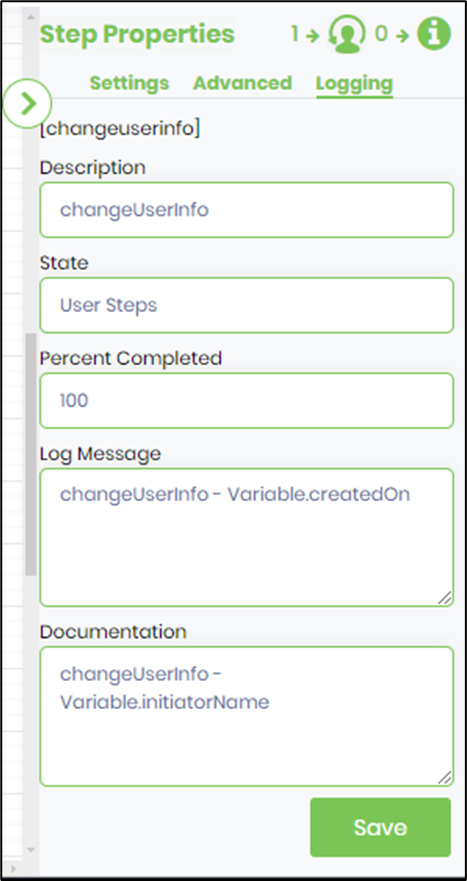
- Save the Process Definition, create a new process instance, and execute it. When the workflow reaches the Change User Info step, FlowWright uses the process user ID and configured user-information values to perform the update. Continue the workflow using the appropriate return path.
Tips:
- Always provide a valid Process user ID because it is the only required input.
- Configure only the user-information properties that need to be changed.
- Use meaningful Variable names when supplying dynamically generated values.
- Validate user information before executing the update.
- Verify that the email address supplied by the workflow has the expected value and format.
- Test username changes carefully because username changes may affect subsequent workflow operations.
- Connect the True path to the next activity when the update succeeds.
- Connect the False path to appropriate alternative or error-handling logic.
- Test the workflow with representative user records before deploying it.
- Verify the user's information after the workflow executes.
- Avoid assuming that omitted optional properties will clear existing user values; the supplied XML only establishes that those properties are optional.
- Do not assume additional user attributes can be changed through this step because the supplied definition exposes only username, full name, and email as optional user-information inputs.
Definition Sample:
You may download the sample definition(s) from the link provided and later import them (drag-and-drop) into your FlowWright Process Definition (XML file) or Form Definition (HTML file) page.
Note: After the import, verify and complete any missing configurations, such as file path references and database connections. Then, save the definition to confirm the changes.
Click here to download the sample file.