As you may know, you can build custom steps to perform any functionality you want and use them within workflows. Many of our customers build custom steps to perform specific functionality within workflows, but what about validating these step inputs? We explain how it works here.
Custom step validation can be easily implemented within the step. First, implement the step using the "IFWStep2" interface. This will let you implement a new "validate" method in your step. Here's an example of what implementing the "validate" method looks like:
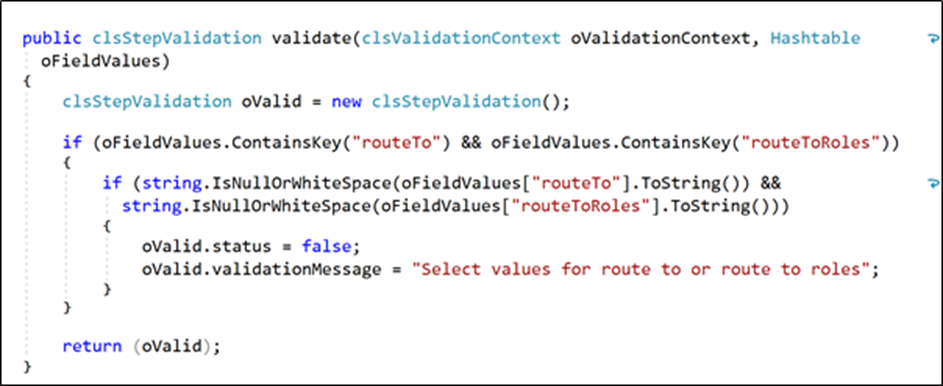
The method above provides a validation context and a hash table containing a list of inputs and their values. As you can see from the code, the validation code checks whether the "routeTo" and "routeToRoles" inputs have values. Once everything is set, the method returns a clsStepValidation object.
FlowWright is all about simplicity, and as you can see from the example above, we have made custom step validation extremely simple to implement. Use custom validation to ensure that the values users configure for step properties are correct.