clsStoreFileInDB step
Description:
The Store File into DB step enables a FlowWright workflow to store a physical file from the file system into the FlowWright database.
Many business processes generate or receive files that need to be retained independently of the server's file system. By storing files directly in the database, workflows can centralize document storage, simplify backup and recovery, maintain document references, and support long-term retention without relying on external file locations.
The step accepts the path to a physical file, stores it in the database, and returns the generated database file identifier. Optionally, the workflow can replace an existing stored file by providing its identifier. An additional option allows the original physical file to be removed after it has been successfully stored in the database.
Typical uses include:
- Archiving generated PDF documents
- Storing workflow attachments
- Importing scanned documents
- Persisting reports for long-term retention
- Centralizing business documents
- Replacing previously stored files
- Preparing documents for database-backed retrieval
- Eliminating dependency on temporary file storage
This step enables organizations to securely manage workflow documents within the FlowWright database while supporting document retention, auditing, and centralized storage.
Inputs
- Path to the File – Specifies the physical path of the file that will be stored in the database. This property is required.
- Remove File – Specifies whether the original physical file should be removed after it has been successfully stored in the database. This property is optional.
- Provide Existing File ID – Optionally specifies an existing database file identifier that should be updated or replaced.
- Variable/Global to Store File ID – Specifies the workflow variable or global variable that will receive the database file identifier after the operation completes. This property is required.
Returns
- True – The file was successfully stored in the database, and the database file identifier was returned. Workflow execution continues through the success path.
- False - The file could not be stored because of an invalid file path, missing file, database error, insufficient permissions, or another execution error. Workflow execution follows the alternate path.
Usage:
The Store File into DB step is typically used after a document has been generated, downloaded, or received from an external system and needs to be retained within the FlowWright database.
During execution:
- Read the configured physical file path.
- Verify that the file is available.
- If an existing database file identifier is supplied, update or replace the existing stored file.
- Otherwise, create a new file record in the database.
- Store the generated or existing database file identifier in the configured workflow variable or global variable.
- Optionally remove the original physical file if the Remove File option is enabled.
- Continue workflow execution through either the True or False return path.
A typical workflow might look like this:

Typical workflow scenarios include:
- Storing generated reports for permanent retention
- Archiving invoices after approval
- Importing scanned documents into the database
- Saving exported workflow documents
- Replacing previously stored document versions
- Persisting documents before deleting temporary files
- Centralizing business records
- Preparing files for later retrieval by database file identifier
Example:
Let’s build and execute the “storeFileInDBDef” example:
- Create a new process definition named “storeFileInDBDef" and open it in designer mode.
- Drag a “storeFileInDB” step to the canvas.
- Connect the dots between the “Start” step and “storeFileInDB” steps, as shown above.
- Select the line between the steps to configure the “Connection Properties”. The default property values are “None, True, False, Error, and Evaluate”. Depending on the step’s purpose, additional configuration options are available.
- Define a variable or a global to store the File ID.
- Click the “storeFileInDB” step to configure its “Required” properties. Provide a name for the step, the source file path, and a variable or global reference to store the File ID. Click the Save button. Note: Click the "AI Predict" button for the Copilot to add new process steps that match your process description.

- Click the “storeFileInDB” step to configure its “Optional” properties. Select “Yes” to remove the file using its File ID from the provided path. Enter the existing File ID. Click the Save button.

- The “Logging” configuration is necessary for documentation and also measures workflow progress and percent complete. This is achieved by configuring the step state and percent fields individually, as shown below. Configure the “Logging” using the following properties.

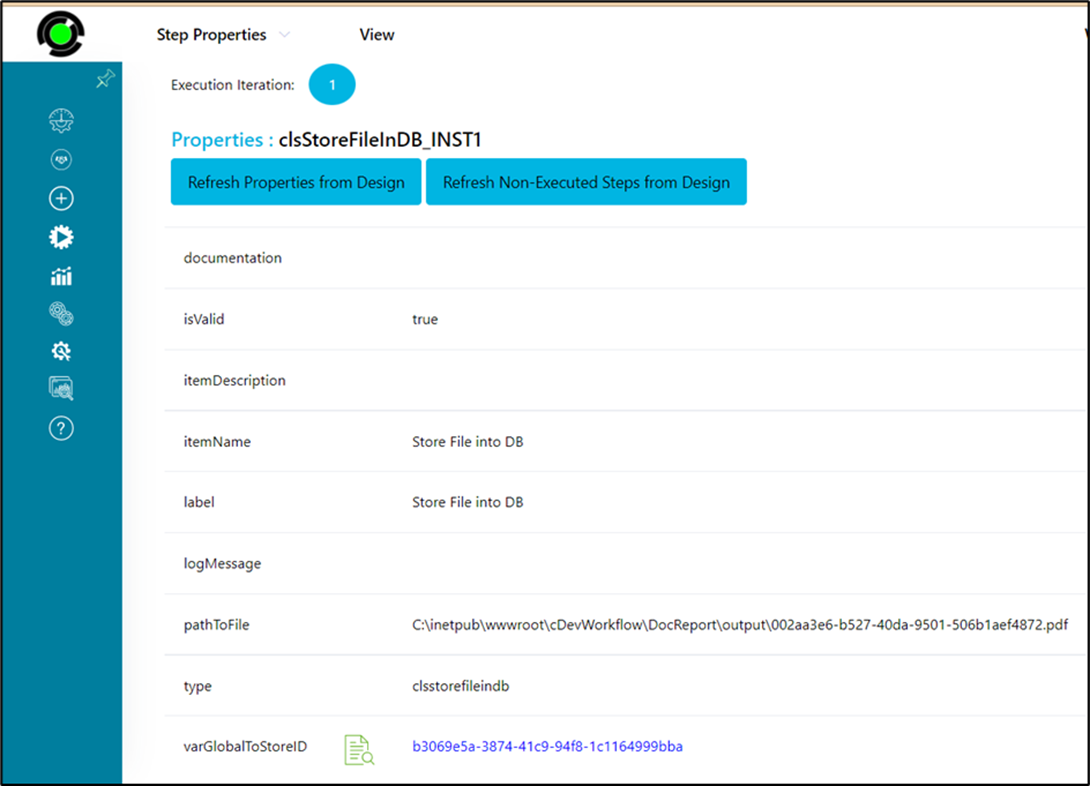
- Save the process definition, create a new instance, and execute it. The step stores the file as a new record in the “deFileStore” table and returns the FileID as a reference. Navigate to Process Instances, render this process instance, click the storeFileInDB step, and view varGlobalToStoreID.
- To replace the file in the “deFileStore” table, click the “storeFileInDB” step to configure its “Required” properties. Enter the step name. Enter the source file path. Enter the variable or global reference to store the File ID. Click the Save button. Note: Click the "AI Predict" button for the Copilot to add new process steps that match your process description.

- To replace the file in the deFileStore table, click the “storeFileInDB” step to configure its “Optional” properties. Select the “Yes” button to replace. The “path to the file" input is the server path for the new file or its “variable.value”. Provide the existing file in the “storeFileInDB” table using its FileID. In this case, the variable or global to store the replaced FileID shall be the same “variable.value” as shown below.

- Save the process definition, create a new instance, and execute it. The step replaces the file in the “deFileStore” table using the FileID as a reference. Navigate to Process Instances, render this process instance, and click the “storeFileInDB” step to view the properties and the variable value “varGlobalToStoreID”.
Tips:
- Verify that the specified file exists before executing the step.
- Use Remove File to delete temporary files after successful database storage.
- Supply an Existing File ID only when updating or replacing an existing stored document.
- Store the returned file identifier in a workflow variable for use by later workflow steps.
- Route the False execution path to logging and notification activities for easier troubleshooting.
- Combine this step with Generate PDF, Download File, Send Email, Document Management, or archival workflow steps to build complete document storage solutions.
Notes:
- The step stores a physical file in the FlowWright database.
- The Path to the File property is required.
- The Variable/Global to Store File ID property is required.
- The Existing File ID property is optional and can be used to replace an existing stored file.
- The Remove File option determines whether the original physical file is deleted after successful storage.
- Both the True and False return paths should be implemented for complete workflow handling.
- Ensure that the executing workflow has permission to read the physical file and write to the FlowWright database.
Store File into DB vs. DMS Upload Document:
Although both workflow steps make documents available for future use, they store files in different repositories and serve different business purposes.
| Store File into DB | DMS Upload Document |
|---|---|
| Stores a physical file directly in the FlowWright database. | Uploads a document into the FlowWright Document Management System (DMS). |
| Returns a database file identifier for later workflow processing. | Returns information related to the uploaded DMS document. |
| Can optionally replace an existing stored database file using an existing file ID. | Typically creates or updates a managed document within a DMS folder. |
| Can optionally remove the original physical file after successful storage. | Generally retains the uploaded source document while managing it through DMS features such as metadata, versioning, and permissions. |
| Intended for database-backed file storage and retrieval. | Intended for enterprise document management, collaboration, and lifecycle management. |
As a general guideline:
- Use Store File into DB when workflows need to retain files within the FlowWright database and reference them using a database file identifier.
- Use DMS Upload Document when workflows need to manage documents within the FlowWright Document Management System, including folder organization, metadata, version control, permissions, and document lifecycle management.
Definition Sample:
You may download the sample workflow definition from the link provided and import it into your FlowWright environment.
Note: Verify and complete any missing configuration after importing the sample, including:
- Physical file path
- Remove File option
- Existing File ID (if replacing a stored file)
- Variable/Global to store the returned file identifier
- Success and failure workflow branches
After verifying the configuration, save and publish the workflow before execution.
Click here to download the sample file.